



Zotac ZBOX HD-ID11 Review: Next Gen ION is Better & Worse than ION1
by Anand Lal Shimpi on May 6, 2010 3:51 PM EST- Posted in
- GPUs
- Next Generation ION
- HD-ID11
- ZOTAC
- NVIDIA
Zotac’s ZBOX HD-ID11
Zotac struck gold with its first desktop mini-ITX ION board, and since then the company has been on a roll with very tiny, highly integrated motherboards and barebones systems designed for HTPC use.
The ZBOX is Zotac’s barebones small form factor system line. The HD-ID11 is the first ZBOX to use NVIDIA’s Next Generation ION paired with Intel’s Pine Trail Atom platform.
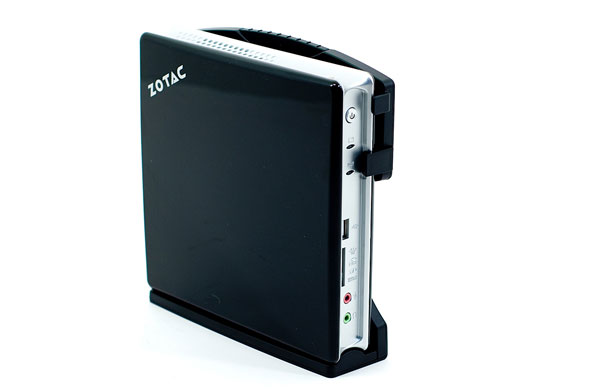
For $259.99 the HD-ID11 will give you a dual-core Atom D510, a 16-core GT218 GPU with 512MB of DDR3 memory, WiFi, a single 2.5” HDD/SSD bay and a single DDR2-800 SO-DIMM slot. Remember the memory controller here branches off the Atom D510 and it’s only a single channel 64-bit controller. The original ION used a dual-channel DDR2/DDR3 controller so you actually get less total memory bandwidth with this platform. Unlike the original ION however, the GPU gets its own dedicated frame buffer - so the CPU and GPU don’t have to share the bandwidth.
The chassis is all plastic, but it’s a fairly thick/dense plastic so it doesn’t feel overly cheap. I’d say we’re smack in the middle of the cheap to luxurious plastic spectrum.


You can lay the chassis flat or slide it into a stand and roll with it Wii-style. The front of the ZBOX has headphone and mic jacks, a SD card reader and a single USB port. You get network and drive activity indicators and a power button. Turning the machine on lights up a blue O on the top of the case.
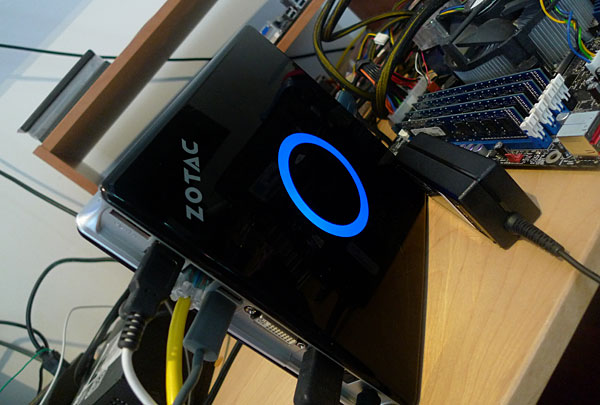
On the side you get another USB port, and on the back you’ve got four more bringing the total count up to six. That’s more USB ports than a Mac Pro on something smaller than an old Xbox 360 HD-DVD drive.
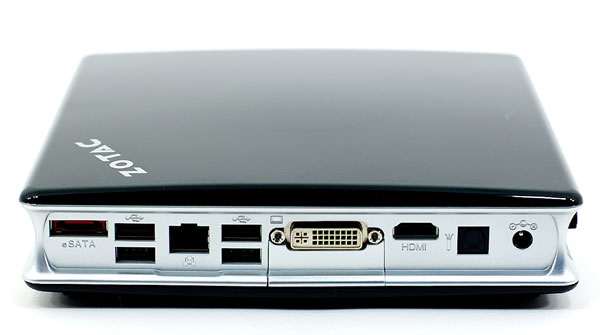
You get DVI and HDMI outputs, 10/100/1000 Ethernet, eSATA and optical out. As I mentioned earlier, WiFi (802.11b/g/n) is included but there’s no external antenna. There are two antennas inside.
Getting inside the ZBOX is pretty easy. Remove two thumbscrews and push the cover away to reveal the spacious motherboard. Another thumbscrew will hold the 2.5” HDD/SSD in place.
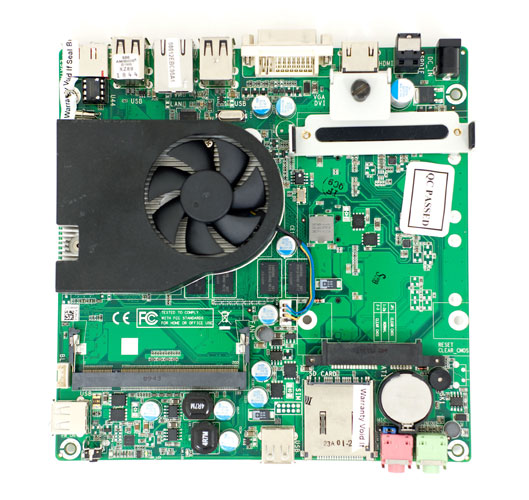
The 2.5” bay (if you can call it that) is sort of in the thermal shadow of the CPU/GPU/chipset heatsink, and it does get warm during use. I’d strongly recommend using a SSD not only because it does keep the system cool, but it makes using an Atom far more bearable. Pairing a slow CPU with a slow hard drive doesn’t make things any better surprisingly enough. With an SSD however, it feels more like you’re using a slow CPU in a modern system rather than a slow machine.
On the other side of the motherboard you’ll find the WiFi card as well as an open mini PCI Express slot for expansion. Zotac uses two of the NM10’s PCIe lanes to feed these ports, leaving only a x1 lane for the NVIDIA NG-ION GPU.
The fan is audible under heavy CPU load but overall the system is pretty quiet. In a room that by itself had an ambient noise of 32dB(A) the ZBOX HD-ID11 measured 33 - 34dB(A) an inch away from the system while playing back H.264 content. If you’re sitting across the room you’d be hard pressed to hear it. Fire up a bunch of CPU intensive applications however and the tiny internal fan will spin up and get annoying very quickly. I measured as much as 55dB(A) an inch away from the system with the fan at full bore.
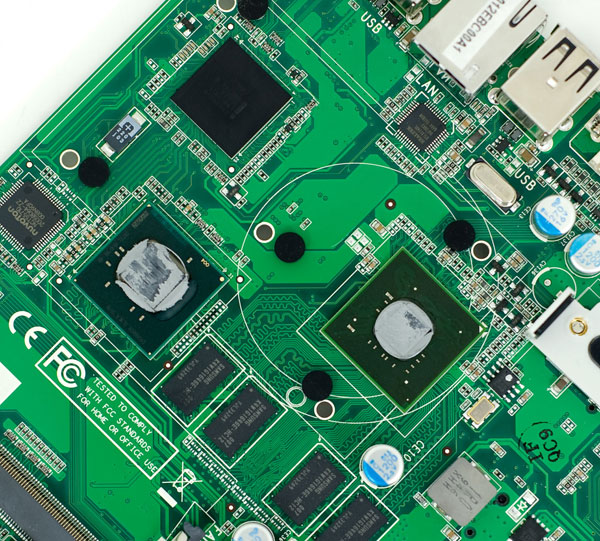
The NM10 Express chipset (top), Intel Atom D510 (left) and NVIDIA NG-ION GPU (right)
The more audible part of the system was actually the power adapter. I got a constant whine from the power brick whenever it was plugged in with the machine turned off. Zotac tells me that the shipping models will have a different power cable, and they can't reproduce the issue so perhaps it's a problem with my unit.
Wake on USB works...sort of. I can wake the ZBOX up with USB mouse hooked directly to the machine but when going through my iogear switch box no USB perhaps will wake the machine. On top of that, any keystrokes/mouse clicks I perform while the machine is asleep seem to get buffered and all fire as soon as I get back into Windows. Again this only happens going through my iogear KVM, a direct attached mouse works as expected.


 Facebook
 Twitter
 RSS
RSS


40 Comments
View All Comments
rnjeezy - Thursday, May 6, 2010 - link
and switch wifi to usbTekkamanraiden - Thursday, May 6, 2010 - link
While this looks pretty kick ass I'm looking forward to the Amd version. I'm curious how well the Neo processor with 3200 will do against the Aton with Ion2.Soulkeeper - Friday, May 7, 2010 - link
I too would like to see products from amd and/or via to compete here.I'm tired of "the intel show" 24/7
I wouldn't pay $100 for that ion thing
dealcorn - Friday, May 7, 2010 - link
As the Zotac NM10-B-E motherboard is shipping with HDMI and the Intel NM10 chipset, the Broadcom Crystal media solution is a viable build your own HTPC strategy that operates on fewer watts. I would have liked a side by side comparison.nick.cardwell - Friday, May 7, 2010 - link
Does this or any ION2 nettop use Optimus??? I am looking for a small D510 system to run headless and would be willing to buy an ION2 system strictly for the resale value if it uses Optimus to switch off that power hungry GPU. I am sill waiting on the Shuttle XS35 to show up as it is fanless.CZroe - Friday, May 7, 2010 - link
The comments in the article about manufacturers not wanting to reclaim PCIe lanes from WiFi and GbE don't sound so convincing. For example, they could easily integrate WiFi via internal USB or an Ethernet bridge.Heck, if nVidia wanted to make a real symbiotic chipset to go with this they could actually engineer a GbE/WiFi chip that uses multiple internal USB ports to achieve enough bandwidth. And by "enough" I mean "somewhat more than 100mbps but less than 1,000mbps." Users can't often maximize GbE because they need a GbE switch for full duplex and, assuming a max-speed file copy, a destination drive which can write as fast as the source can send. I doubt many users really need GbE over 10/100 Fast Ethernet/802.11n.
Also, what happened to all the rumors of an OC'd PCIe bus for ION2?
As for Zotac's design, I'd much prefer a larger, cooler, quieter design than this, especially if it is going in a home theater. If it would still be super-small, why not give it a proportionally huge HSF? The LEAST they could do is give it metallic housing and throw a heat pipe on it (even just one side).
rennya - Friday, May 7, 2010 - link
The latency guys, the latency.KaarlisK - Sunday, May 9, 2010 - link
Besides which, the NM10 chipset only has 1 USB2 controller, so no increase in bandwidth from ganging USB ports.modemide - Friday, May 7, 2010 - link
I enjoyed the article and this looks like a viable option for my next HTPC. However, I didn't see anything addressing the signal issues most people experienced with the initial version. Can you comment on that?Thanks.
Bateluer - Friday, May 7, 2010 - link
How come we don't see any of the ULV CPUs in form factors like this? I cannot imagine it'd be too difficult to stick in a Celeron SU2300, or a Pentium SU4100, or one of the ULV C2S chips. There's super netbooks that are thinner than these nettops that use these ULV chips. I can't imagine that designing a little beefier cooling system in the same Zotac chassis or into the Acer Revo chassis would be overly difficult. It may add a little to the price, but the trade off in performance might be worth it.