



Dell U2713HM - Unbeatable performance out of the box
by Chris Heinonen on October 4, 2012 12:00 AM ESTDell U2713HM Design, OSD, and Specs
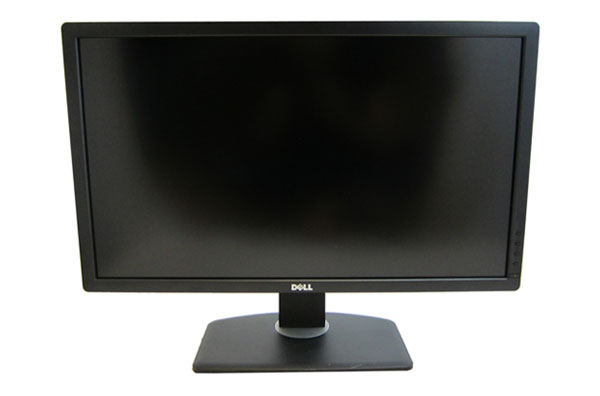
The U2713HM is an LED-backlit display that offers the sRGB colorspace and a resolution of 2560x1440. It uses an IPS panel that is 8-bit, but unlike the U2711 doesn’t support AFRC for simulated 10-bit color. Like all Dell monitors I have seen so far, it has a base that supports height, tilt, pivot, and swivel adjustments. Installation is a snap with Dell’s standard mounting system where you just slip the monitor onto the stand and it clicks into place. The front is nice and clean, lacking any stickers or text aside from the Dell logo, and all the OSD controls are handled by a set of unlabeled buttons on the right-hand side.
I have to complement Dell on the packaging for this monitor as well. Totally forgoing Styrofoam and only using a simple cardboard design, similar to recent Sony Blu-ray players, it both keeps the display safe and doesn’t fall apart, making it easy to reuse the packaging later. If you aren’t keeping the packaging, it also makes recycling the included materials much easier. I appreciate both the eco-friendliness and the ease of removing the monitor from the box. Dell thankfully puts a page detailing the monitor setup at the very top of the box, something other vendors would be wise to start doing.
Dell's U2713HM also offers 2x USB 3.0 ports on the side, and two more on panel with the video connections. The panel offers DisplayPort 1.2, VGA, DVI, and HDMI inputs, as well as a connection for Dell’s soundbar speaker. The PSU is integrated into the display so there is a standard 3-prong IEC socket rounding out the connections. Nothing on the U2713HM is flashy or groundbreaking; it's just very utilitarian. It’s not going to stand out in a way that makes you remember it at first glance, but after using so many other displays I also find there isn’t anything poorly designed that stands out either. Overall the design of the Dell U2713HM is clean and well done.


I have always given Dell high marks for their OSD and I will continue to do so here. With four buttons to control it, none of which are labeled, you would think it might be tricky but it is not. With clear on-screen labels and descriptions of the controls, as well as avoiding the common mistake of having keys labeled with arrows control menus that move the other direction, Dell does a good job here of making it easy to navigate and control. The menu options are clear, with your standard preset modes, brightness and contrast, input selection, and more display settings. One missing item is an option for an overdrive or gaming mode to improve pixel response, though in practice we haven't seen major improvements from such modes on other displays. Another missing feature is the ability to automatically select an input, which makes using it with multiple devices a little harder. The OSD remains essentially unchanged from previous Dell displays, but they have no reason to go back and reinvent it either.


Viewing angles are good for an IPS as we expect them to be. There is a light coating of anti-glare, but nothing that I find to be objectionable or that caused issues with the image for me. Unless you're trying to look at the U2713HM from a 170 degree angle or so, you shouldn't have any issues viewing it and seeing color or contrast shifts in normal use.


| Dell U2713HM | |
| Video Inputs | DisplayPort 1.2, DL-DVI, HDMI, Dsub |
| Panel Type | IPS |
| Pixel Pitch | 0.23mm |
| Colors | 16.7 Million |
| Brightness | 350 Nits |
| Contrast Ratio | 1000:1 |
| Response Time | 8ms GTG |
| Viewable Size | 27" |
| Resolution | 2560x1440 |
| Viewing Angle | 178/178 Horizontal/Vertical |
| Backlight | LED |
| Power Consumption (operation) | 42W Typical |
| Power Consumption (standby) | 0.5W |
| Screen Treatment | Light Anti-Glare coating |
| Height-Adjustable | Yes, 4.5" of range |
| Tilt | Yes |
| Pivot | Yes |
| Swivel | Yes |
| VESA Wall Mounting | Yes, 100mm |
| Dimensions w/ Base (WxHxD) | 25.17" x 7.89" x 16.70" |
| Weight | 12.44 lbs. without stand |
| Additional Features | USB 3.0 hub (4 port), Dell Soundbar Power Connector |
| Limited Warranty | 3 years |
| Accessories | DVI Cable, VGA Cable, USB Cable |
| Price | $799 |
The design and user interface of the Dell U2713HM seem to be up to the task, but how does it perform relative to other 27" models that have recently come through for testing?


 Facebook
 Twitter
 RSS
RSS


101 Comments
View All Comments
Dug - Thursday, October 4, 2012 - link
I agree.Not only are the Korean monitors a crap shoot for quality, they look so frickin cheap I would be embarrassed to have one on my desk.
dgingeri - Thursday, October 4, 2012 - link
I've had many Dell Ultrasharp monitors ever since my first 2007wfp, and I have never seen a monitor that I liked better, all the way up through the 24" I had until last month. They just make great monitors, if you get the Ultrasharp models. They're a little more expensive, but they're worth it.Last month, I made the mistake of getting an HP 27" just because it was $150 cheaper than the Dell U2711. Oh, sure, it looks great, but it only has a DL-DVI or a DisplayPort input, and no adjustment at all. There are buttons, but they don't seem to do anything other than switch inputs or turn it off. On top of that, the first one I got went bad after a week. The backlight went out. However, I spent too much on it to give up on it now. I do wish I had gone with the Dell.
However, in all those Dell monitors I had, there is one very annoying aspect: archaic card readers. They've always been out of date right out of the box, and use up two drive letters for nothing. Even on my newest 24" monitor, they wouldn't read the current mainstream size SD cards. The 20" wouldn't read anything higher than a 256MB, the 22" wouldn't read over 512MB, and the 24" wouldn't ready anything over 2GB. I've tried removing the drive letters, but Windows grips about it. I tried just disabling the devices in the device manager, but Windows gripes about that too. I do like that one aspect of the HP. At least there's no useless card reader. It looks like they finally dropped the stupid card reader from this one. I like that.
PPalmgren - Thursday, October 4, 2012 - link
As someone who games a lot but wants a nice 8-bit panel, would it be possible to simple add panel type in parenthesis to the graph? It would be helpful in indicating comparable monitors, as TN panels have very low input lag but are not necessarily what you'd be in the market for if you were looking for an 8 bit panel suitable for gaming. As it is, I have to look up each monitor and find out which panel its using, which is difficult given so many sites like to hide it as far down as possible.I've been on the hunt for a ~$600-$700 8-bit panel that has virtually no input lag, to no avail. I had to buy a TN after buying a S-PVA because the input lag is so bad that lips don't sync up with talking/singing in shows viewed on the monitor. Worst $700 I ever spent.
faster - Thursday, October 4, 2012 - link
I bought a GTX680 so that I can render frame rates in games above 60.It is time for the video viewing hardware to catch up to the video rendering hardware.
For $799, 120hz is a must.
p05esto - Thursday, October 4, 2012 - link
Does an IPS, LED, 27"+ monitor exist with 120hz? I'm game, but don't think we are there yet.geok1ng - Thursday, October 4, 2012 - link
There are sold by http://120hz.net/ and http://www.overlordcomputer.com/.Most of the Yamazaki 27" 2560x1440 monitors that you see on ebay and alibaba are capable of more than 60Hz, and the " 2B" PCB can reach 120hz.
even if they cant overclock, like the Achivea Shimean on ebay, without a scaler and using only DL-DVI they have much less input lag, and all the glory of 1440p IPS.
http://hardforum.com/showthread.php?t=1675393&...
p05esto - Thursday, October 4, 2012 - link
I'd love to see a heat temperature number and opinion given with each monitor after a few hours of use. I have a smallish office and my current 26" CCFL monitor get rather warm, it heats up my whole office and is annoying. My face gets warm due to the heat radiating from the front of the screen as well.This is honestly the MAIN reason I want to move to an LED backlighting. It would be an interesting side note in the reviews. You never see specs on how much heat a monitor throws off. I bet this Dell stays pretty cool considering the low power draw.
Olaf van der Spek - Thursday, October 4, 2012 - link
Power in is heat out, so look at the power consumption graph.ryko - Thursday, October 4, 2012 - link
Is nobody else bothered by the fact that for the past 2 high-res monitor reviews the reviewer has resorted to testing at 1080p for gaming and input lag? I understand the desire to compare it to the end all be all of monitors -- a crt from somewhere around 2005, but i find it absolutely ridiculous that you don't even hook it up at 2550x1440 and play a few games on it.How about a "feel" for the input lag if you can't give us exact numbers. If it is terrible you will notice it on a fast-paced shooter. I have seen plenty of other monitor reviews and no one resorts to the lame line of" i don't have a crt that does 1140p so i cant measure the input lag at native resolutions." You go on to say that there "might be some additional lag" since you are testing a t 1080p...is that the scientific term? Just seems ridiculous. How are these other reviewers testing input lag?
Also your input lag numbers seem high compared to what we are seeing around the web with these 2560x1440 monitors. The general consensus is that on models with no scaler, there is 1-2ms lag. On the models with a scaler we are seeing 3-4ms. Not really enough to be concerned about. But your numbers here seem really high...How is that happening?
cheinonen - Thursday, October 4, 2012 - link
I don't know how everyone else is testing lag on their displays. I know some use an oscilloscope for it, which is going to be the most accurate method, but a very cost prohibitive one. Some use a very simple web lag timer, which has multiple flaws as well. I'm using SMTT because it is very fast, very accurate, and has very little margin for error. The highest error I can accidentally record from it is 1ms due to how it works, and averaged out over a dozen or more readings, I can live with that margin of error.It also allows for reading of pixel rise and fall times in addition to input lag, instead of having them combined as one number. This makes it easy to see the clear difference in results between the HP with no scaler and the 27" displays that have to use the scaler. Nothing else has changed in the setup, only the display, so I'm confident about the input lag numbers.
I also know that in playing games, I'm not going to be able to tell the difference between 2ms of lag and 18ms of lag. That's under a frame and I'm not a big enough gamer, or a good enough one, to notice that difference. My subjective opinion there would offer nothing over the objective measures that would be of any use, and so I don't contribute it.