



SanDisk Ultra Plus SSD Review (256GB)
by Anand Lal Shimpi on January 7, 2013 9:00 AM ESTPerformance vs. Transfer Size
ATTO does a good job of showing us how sequential performance varies with transfer size. Most controllers optimize for commonly seen transfer sizes and neglect the rest. The optimization around 4KB, 8KB and 128KB transfers makes sense given that's what most workloads are bound by, but it's always important to understand how a drive performs across the entire gamut.
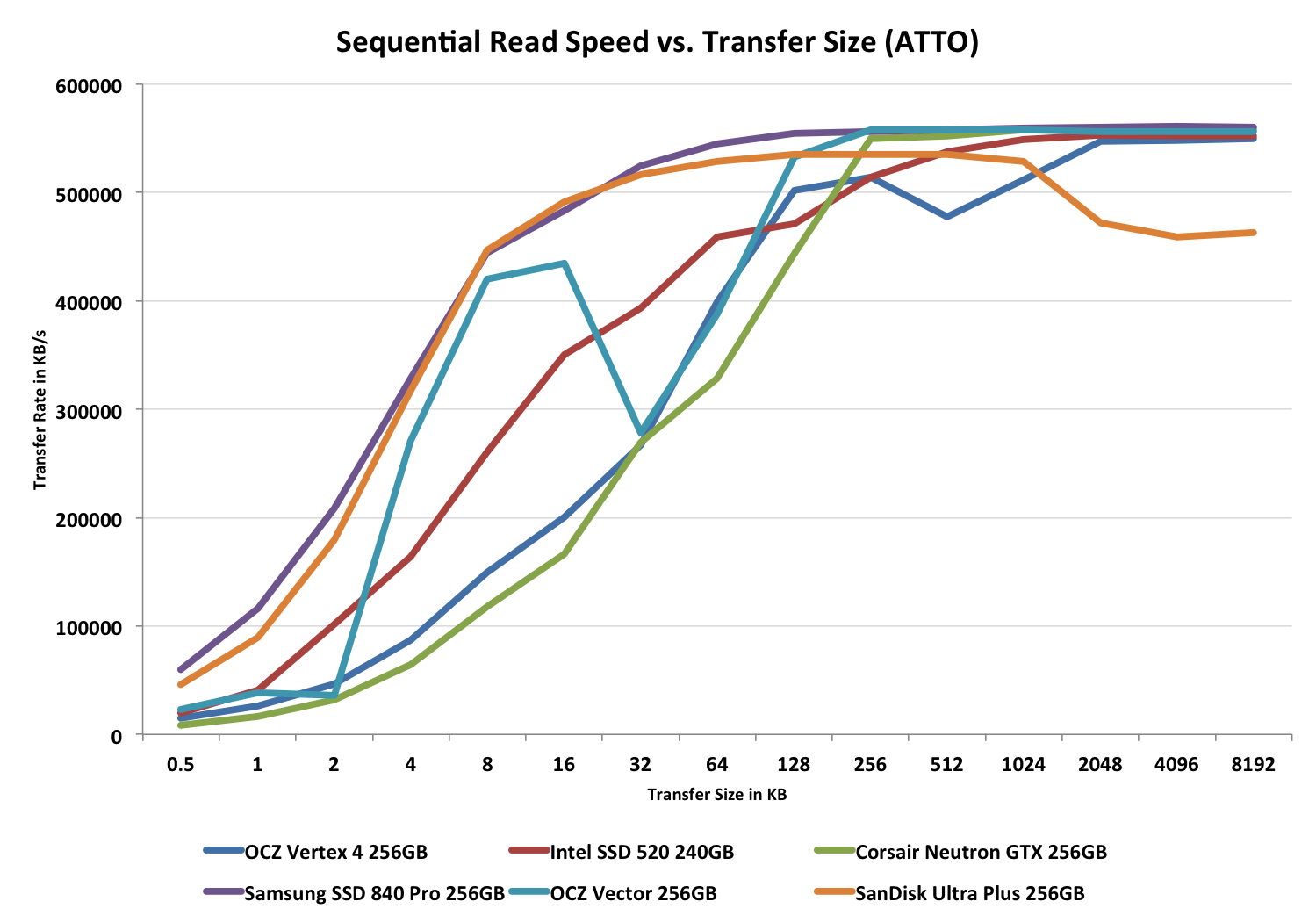
Ah that's a pretty read curve. Other than Samsung's SSD 840 Pro, none of the other vendors here deliver as good and consistent performance at smaller transfer sizes.
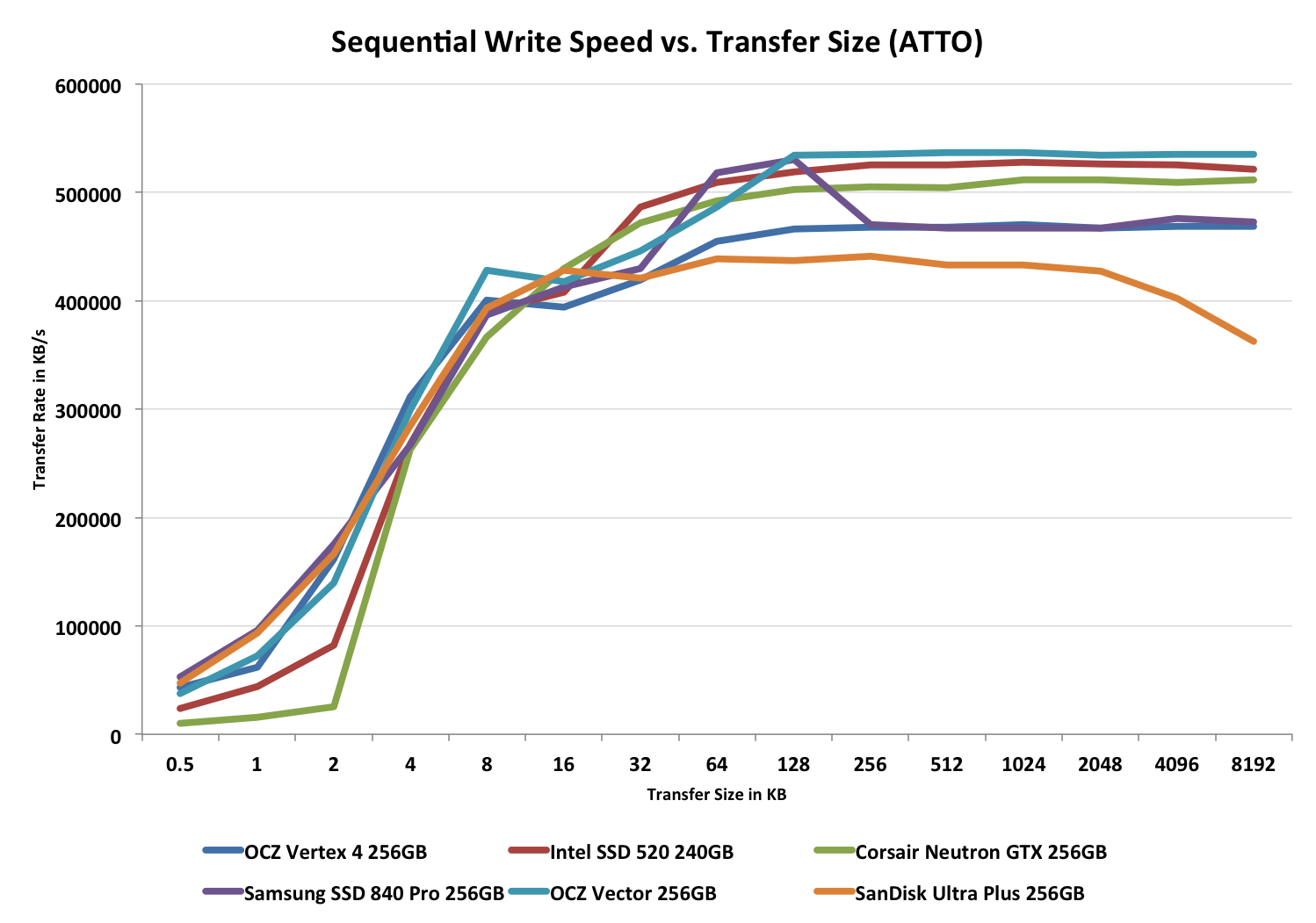
The write curve isn't as impressive. It starts out nicely but does lose out to the higher performers with larger transfer sizes - that 4-channel controller is likely to blame here.


 Facebook
 Twitter
 RSS
RSS


38 Comments
View All Comments
Kristian Vättö - Monday, January 7, 2013 - link
Performance vs Transfer Size and TRIM graphs are missing, I know. Already pinged Anand about those so expect to see them soon (the graphs weren't in our admin engine so I couldn't add them, Anand needs to upload them).vol7ron - Monday, January 7, 2013 - link
The impact of spare area graphs are interesting. OWC has claimed that the spare area doesn't have much of an influence on drives using SF controller, thus defending their non-TRIM support.Perhaps Anand could include an OWC drive in there for comparison.
dave_the_nerd - Monday, January 7, 2013 - link
OWC has to run down TRIM because they sell third-party SSDs to Mac OS X users. Apple forces OS X to disable TRIM on SSDs they don't supply, because they're jerks sometimes.Apple ships its own machines with TRIM enabled, just like everybody else,
There are hacks. But nobody, OWC or otherwise, is going to say, "oh, yeah, our product supports TRIM, but you need to download this sketchy looking program from this guys blog to make it work. Good luck."
Darnell021 - Monday, January 7, 2013 - link
haha yess I just went through that process myself and it's worth adding that every incremental OSX update resets that sketchy little program hack to turn TRIM back off.Still worth it though if you know what you're doing ;)
Samus - Monday, January 7, 2013 - link
"but you need to download this sketchy looking program from this guys blog to make it work."word. true dat, had to do this when I put an Intel X25-M 160GB in my wife's Macbook a few years ago. after about a year it started running crazy slow and fortunately that was just around the time the 3rd party TRIM tool surfaced. works like a charm, but definitely a sketchy solution.
no more sketchy than jail-breaking an iPhone though. pretty much the only reason I jailbroke my iPod Touch was to disable wifi while its sleeping, because, for some reason, Apple DOESN'T allow that.
NCM - Monday, January 7, 2013 - link
I don't see anything "sketchy" about it. A quick trip to the Unix command line enables/disables TRIM in OSX. All the TRIM Enabler utility does is to offer a convenient GUI for that process. It can hardly be said to rise to the level of a hack. The System Profiler correctly shows whether TRIM is enabled or not for either an original or aftermarket SSD.It's always dangerous to impute motives to others, and especially so in the case of the typically secretive Apple. Nonetheless I'd guess that Apple, whose customer support is consistently rated well above that of other PC manufacturers, isn't going to endorse something it hasn't tested, and isn't going to test something it doesn't sell. Therefore OSX neither enables TRIM automatically for third party SSDs, nor prevents users from doing so themselves. Sound pretty neutral to me.
PJCarmody - Tuesday, January 8, 2013 - link
NCM,To your point "isn't going to endorse something it hasn't tested" - Apple is not being asked to endorse the third party options. Not for a moment. So your point is invalid.
I like your open mind but let's face facts: Apple has a history of crippling third party competitors e.g. for storage.
leexgx - Saturday, April 11, 2015 - link
i like to add in OSX 10.10 it now checks all files relating to the hack that allows TRIM to work (basicly its a white list for all Apple SSDs to enable TRIM if your not on that list no TRIM for you)the new tool disables the so called new "security feature to detect tampering of files" to allow you to restore TRIM again, but you have to turn off the trim hack each 10.10.x update on OSX as it turned the security back on resulting in none booting system after update (but is recoverable via safe mode console some commands and so on)
next new features next major update (10.11) will be only boot from Apple only drives (to force you to only buy a SSD from apple for a cool price of £400-£900)
gw019 - Monday, September 16, 2013 - link
"But nobody, OWC or otherwise, is going to say, "oh, yeah, our product supports TRIM, but you need to download this sketchy looking program from this guys blog to make it work. Good luck."Well, I am surprised but in fact Plextor did say something similar: http://www.plextoramericas.com/index.php/faq/22-ma...
Kristian Vättö - Monday, January 7, 2013 - link
Yeah, that's true. SandForce drives perform well when it comes to consistency and there is no big benefit from more OP (I've tested this with 240GB Intel SSD 335).