



MSI's GUS II: External GPU via Thunderbolt
by Anand Lal Shimpi on January 9, 2012 7:43 PM EST- Posted in
- Trade Shows
- Mac
- MSI
- CES
- Thunderbolt
- GPUs
- CES 2012
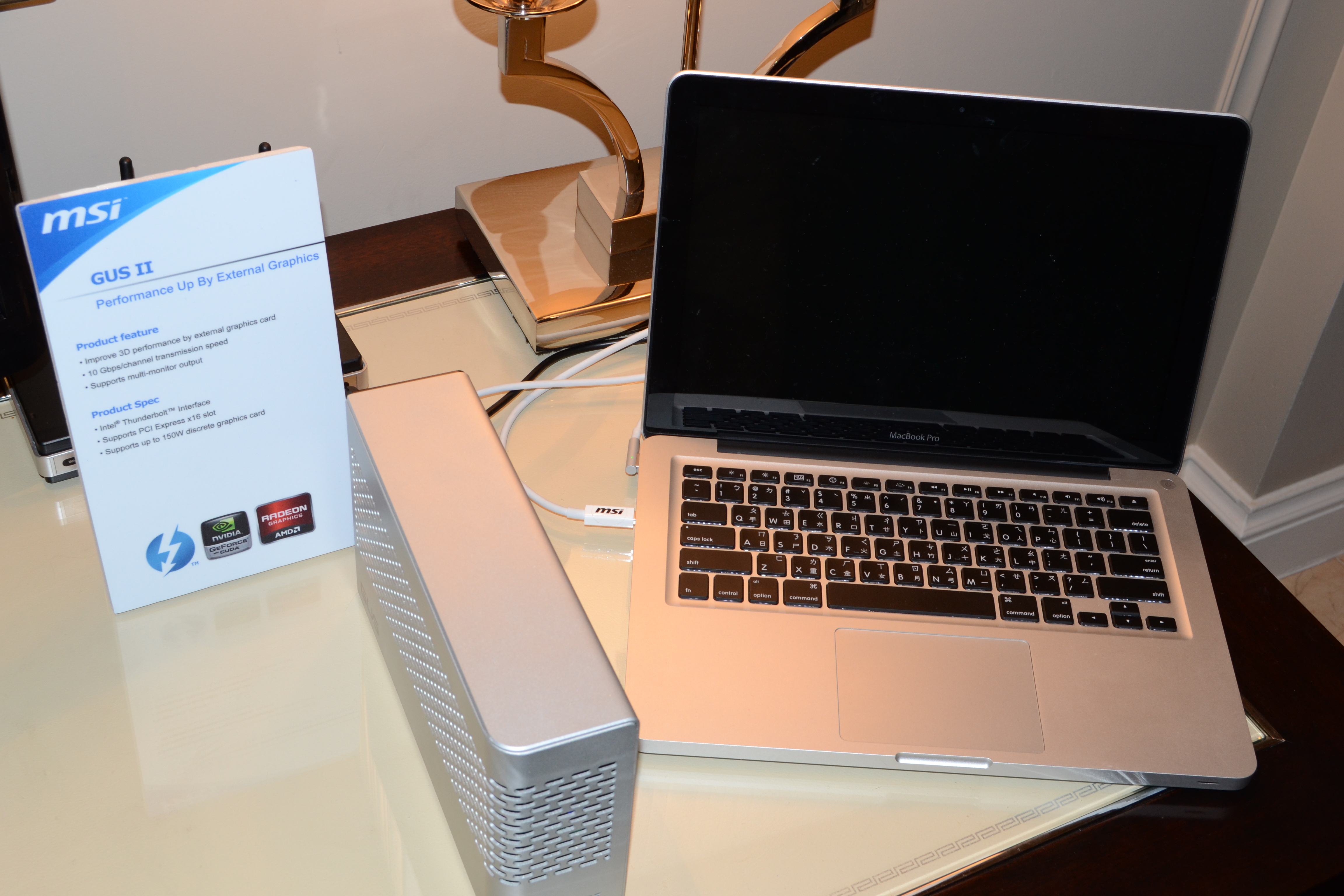
In addition to 7-series motherboards, MSI had its GUS II external GPU solution on display. The external chassis features a Thunderbolt interface and an internal PCIe slot. Despite running on a MacBook Pro there is currently no OS X support for the solution, but it does work under Windows. Presumably if there's OS X support for the GPU inside the enclosure it would work under OS X as well.
The only limitation to the GUS II is the internal GPU has to be powered by PCIe alone (there are no aux PCIe power connectors inside the chassis).
MSI gave us no timeframe for release or estimate on price, but the idea alone is super exciting. I expect to see more of this type of thing as Thunderbolt equipped Ivy Bridge notebooks show up this year.


 Facebook
 Twitter
 RSS
RSS


47 Comments
View All Comments
repoman27 - Tuesday, January 10, 2012 - link
All current Thunderbolt controllers have connections for 4 lanes of PCIe 2.0, including the MacBook Air. All Thunderbolt ports provide two 10Gbps, bi-directional channels over a single cable. They all operate at the same speed. The full 10Gbps is available to the underlying protocol (PCIe or DP) with no 8b/10b overhead.The bottleneck is that all current Thunderbolt controllers only appear to have a single PCIe to Thunderbolt protocol adapter. Even though this protocol adapter has a PCIe 2.0 x4 back end, it only has a single 10Gbps frontside connection to the on-chip Thunderbolt switch. PCIe 2.0 sans 8b/10b runs at 4Gbps. 10/4 = 2.5. The 1250MB/s PCIe throughput a Thunderbolt controller is capable of is equivalent to 2.5 lanes of PCIe 2.0.
If there aren't other devices in the Thunderbolt chain sharing the PCIe bandwidth, an external GPU solution could probably yield some fairly impressive performance gains nonetheless.
Watwatwat - Monday, January 9, 2012 - link
It is a given that it will have external power. Even if pci can supply 75 watts the laptop power supply cannot.Sttm - Monday, January 9, 2012 - link
The black power cable coming out of the rear of it seems pretty given.Zigor - Tuesday, January 10, 2012 - link
Just zoom in and read the product brief:"Supports up to 150W discrete graphics card".
ther00kie16 - Monday, January 9, 2012 - link
Lack of additional power plugs is seriously disappointing. Might as well diy (google it).Pandamonium - Monday, January 9, 2012 - link
VillageTronic's ViDock 2 (I believe that is the model number) used expresscard to power external GPUs. MSI had a predecessor to the GUS 2, IIRC too. The problem with each of these is that they are priced out of the market. They're just too expensive for what they seem to do. And in the case of the ViDock, I am not certain that the USB ports detract from the bandwidth available to the GPU, or if the USB ports pull from expresscard's USB access simultaneously while the GPU uses the x1. I think I had a lengthy query about it on the AT forums some months ago.zanon - Monday, January 9, 2012 - link
Was going to post this in the other comment, but thought it deserved it's own. Really, given the general trend towards portables I'm honestly surprised to have not seen Nvidia in particular push this REALLY hard. The overall trend of the market is heavily towards notebook/ultrabook-class systems. AIOs continue to sell in significant numbers too, and all of them represent a vast swath of users where the best that can be hoped for is often to make it onto the mobile chipset, and even then Intel is furiously pushing their ever-more-integrated graphics (and of course AMD has potential with Fusion).This would seem like a big, golden and possibly single opportunity for Nvidia to open up the ability to sell real cards to this entire market. There could be bare PCIe expanders for the more technical groups, but fully integrated solutions that are literally plug-and-play are very feasible and even better for a lot of groups then traditional solutions (no need to open anything up, handle anything board-y, even think about "molex" or case cooling, just have a shiny attractive external case unit that has a cable to the computer and one for power). Seems like a big chance to mix things up a bit, I'm kind of sorry to not see Nvidia pushing TB a LOT harder.
repoman27 - Monday, January 9, 2012 - link
Well, the only PCs to ship with Thunderbolt thus far are Macs, and Apple went all AMD/Intel this year for graphics, so there aren't any Mac drivers for NVIDIA GPUs released in the past 12 months. So I'm guessing that may have something to do with NVIDIA not pushing TB too hard yet.I totally agree with the complete solution concept, although I kinda figure they might come from the partners rather than AMD/NVIDIA directly. If you think about it, the performance of a Thunderbolt GPU setup is clearly going to plateau at the point when the available PCIe bandwidth becomes a bottleneck. If you select the lowest power / lowest cost GPU capable of saturating PCIe 2.0 x2.5 on a regular basis, and build a custom card around it specifically optimized for the low bandwidth situation, add the TB controller right on board and a power supply and cooling solution custom tailored to a compact external enclosure... Now you've taken all the guesswork out of it. You have the maximum performance you're going to get out of this type of setup, in the smallest form-factor, and maybe even at a reasonable price.
zanon - Monday, January 9, 2012 - link
>so there aren't any Mac drivers for NVIDIA GPUs released in the past 12 months. So I'm guessing that may have something to do with NVIDIA not pushing TB too hard yet.I don't find that convincing. This stuff doesn't just happen by magic, as the Nvidia vs AMD driver situation has shown. Nvidia often has done dramatically better with drivers and game performance because they expend dramatically more resources connecting with developers. By the same token, they could have done a lot more to talk up TB, to push PC makers to include it, and for that matter to negotiate with Apple. Apple themselves have every reason to want TB to succeed and of course to push their own portable machines, which is a major profit center for them. Anything that boosts that could be of mutual benefit, maybe even a way to more widely get back into that particular segment.
I think Nvidia just plain hadn't really thought about it, which is unfortunate.
>If you think about it, the performance of a Thunderbolt GPU setup is clearly going to plateau at the point when the available PCIe bandwidth becomes a bottleneck.
See my other response above, but this could be a much higher plateau then you seem to be assuming, at least for non-compute work. Also, it's not like there is exactly a very high plateau to surpass when the competition is the HD3000 or whatever.
But yeah, with a bit of nice engineering it certainly seems there could be a market ripe for the picking, even on the Mac side.
repoman27 - Tuesday, January 10, 2012 - link
I've checked out a fair number of PCIe scaling tests, and I understand what you're saying. At x4 things look pretty darn good, the impact ranges from negligible to roughly 18% in some scenarios. When you look at x1, however, things become a bit grimmer. Of course nobody has posted test results for x2.5 because that isn't a normal scenario, so it's hard to say where the choke point really is.I reckon the performance plateau for a TB connected GPU is still considerably higher than HD3000, but what about vs a 6770m? Would it still be worth the money to buy an external upgrade?